Web Dashboard
GoodPipeline ships a mountable Rails engine for inspecting executions and pipeline definitions. Its versioned CSS and JavaScript require no host application build step. Mermaid and web fonts are loaded from their CDNs.
Mounting the engine
# config/routes.rb
# Protect this mount with your application's administrator authentication.
mount GoodPipeline::Engine => "/good_pipeline"
The dashboard is then available at /good_pipeline. Links, partial navigation, and the theme endpoint all honor a non-root mount path. The engine does not provide authentication, so treat the mount as admin-only; see Securing the dashboard.
Pipeline mutation controls are read-only by default. After protecting the mount, enable them explicitly:
# config/initializers/good_pipeline.rb
GoodPipeline.dashboard_mutations_enabled = true
Only literal true enables mutations. The setting hides the controls and makes direct mutation requests return 403 Forbidden; it does not authenticate or authorize visitors. Theme changes remain available in read-only mode.
Theme
The dashboard defaults to dark in GoodPipeline 0.5. Use the topbar control to switch between dark and light; the choice is stored in a permanent, same-site cookie. Dashboard theme state uses data-gp-theme, so it does not alter theme attributes used by the host application.
Pipeline executions
The index page combines:
- A pipeline-type sidebar with run counts, failure strategy, branch, and large-pipeline indicators
- Status, time-window, and ID-prefix/type search filters that compose without dropping one another
- Status counts computed before applying the selected status, so every segment shows the number of rows it would select
- Offset pagination with 25 executions per page
- Expandable rows with step detail, identity and parameters, stage timelines, and copyable Ruby and SQL requery snippets
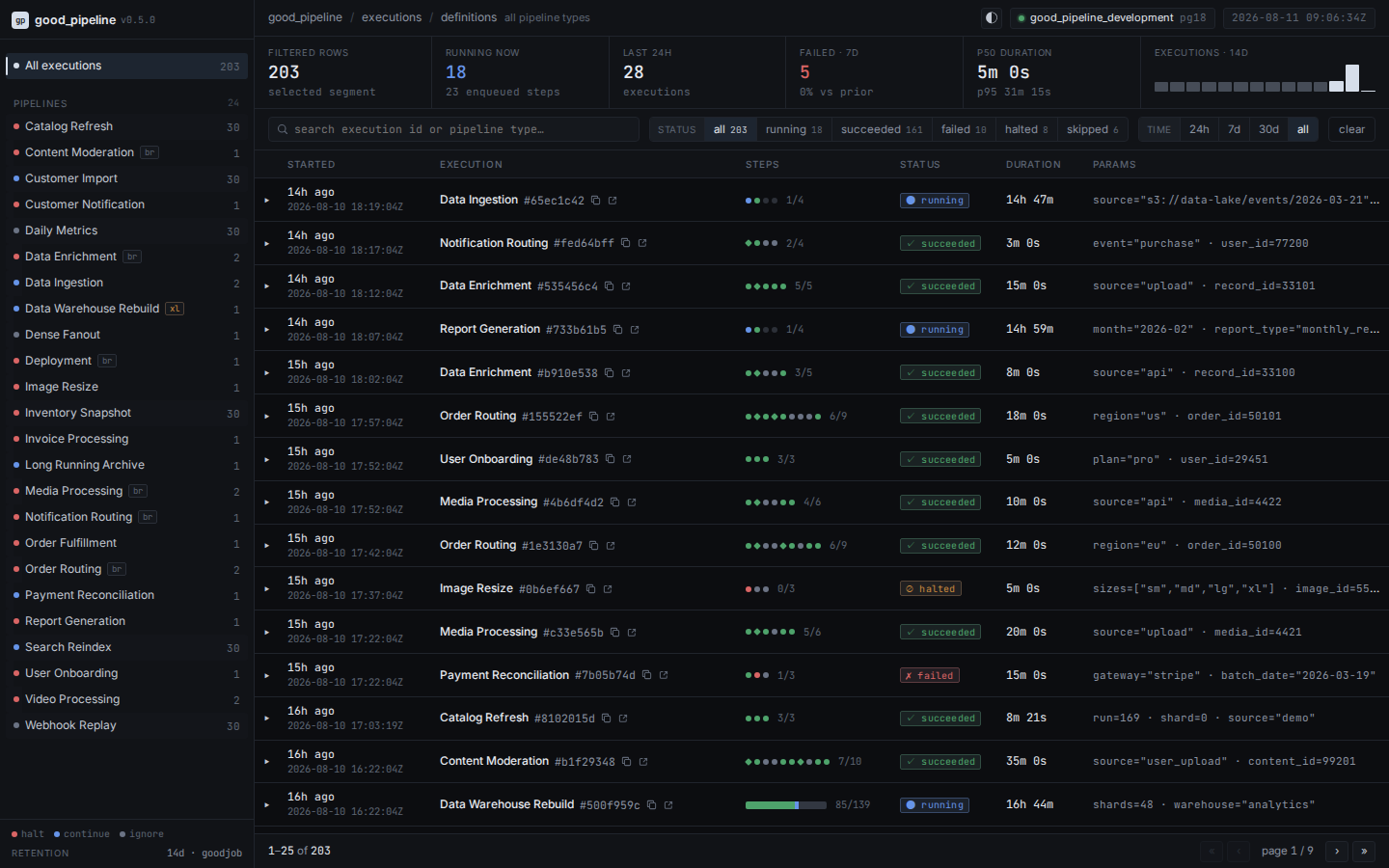
KPI scope
The filtered-row KPI matches the pager and therefore respects type, status, time, and search filters. The remaining KPIs are operational summaries scoped only by pipeline type: running now has no time cutoff, while throughput, failures, duration percentiles, and the sparkline use their displayed fixed windows. canceling counts as running now; terminal canceled executions contribute to duration percentiles but not the failure KPI. KPI results are cached together for 30 seconds.
Pipeline details
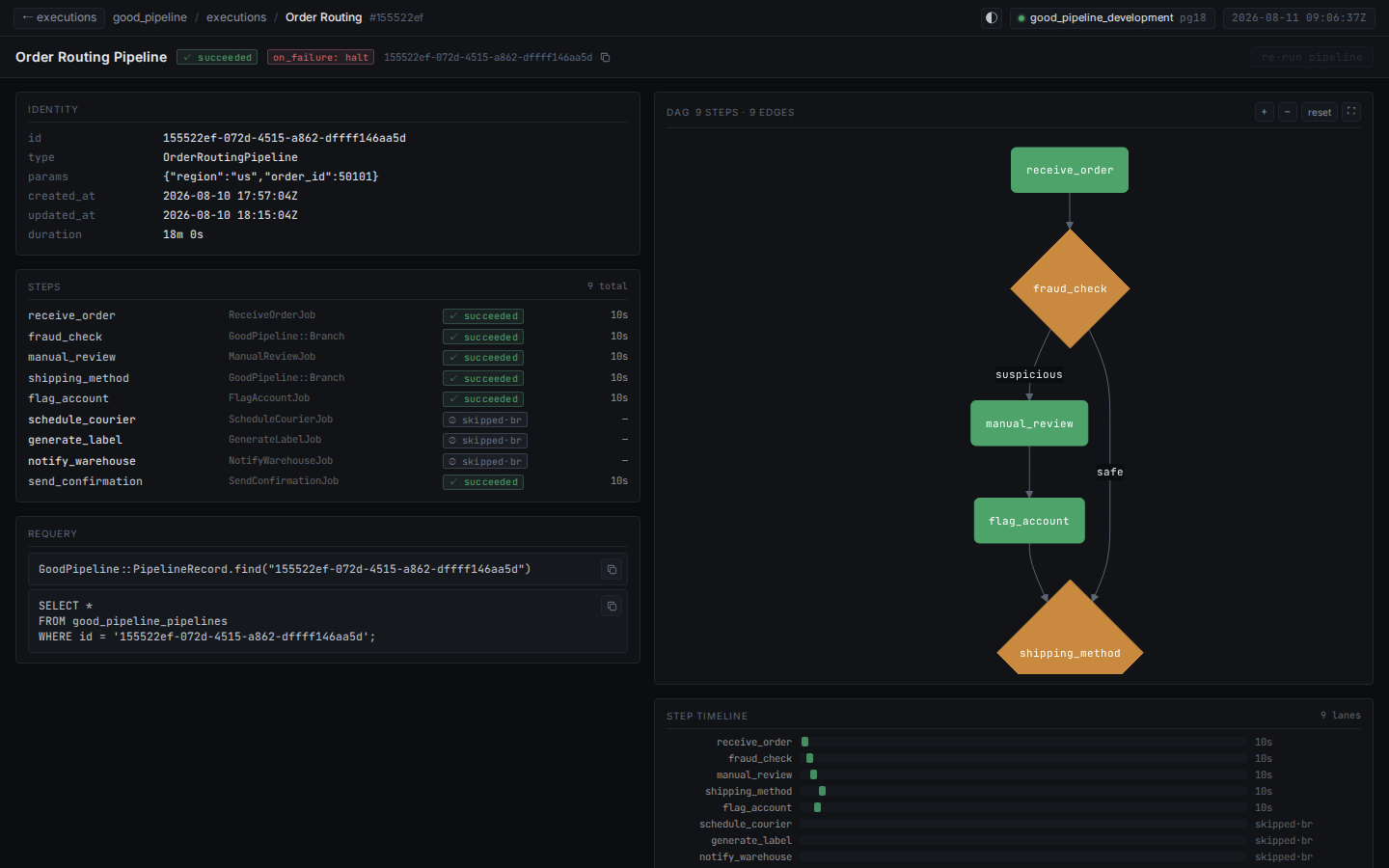
The detail page shows identity, parameters, failure strategy, chain links, requery snippets, a step table, an interactive DAG, and a stage timeline. Step keys continue to link to GoodJob when the corresponding job record exists, and failure class/message text remains visible for triage.
Canceling an execution
When dashboard mutations are enabled, the Cancel pipeline action performs a graceful scheduling stop. For a pending pipeline, cancellation immediately sets the pipeline and its pending steps to canceled. For a running pipeline, it sets the pipeline to canceling, marks pending steps canceled, and prevents any future downstream steps from being enqueued.
Jobs already handed to GoodJob — including enqueued, scheduled, and retrying jobs — run normally. GoodPipeline does not change their GoodJob records or force-terminate workers, and each step retains its actual succeeded, failed, or halted outcome. The pipeline becomes terminal canceled only after every enqueued job finishes. Until then, canceling is active and nonterminal; it can remain that way indefinitely if a job never reaches a terminal outcome.
Re-running an execution
The Re-run pipeline action is available after an execution reaches succeeded, failed, halted, skipped, or canceled. It creates a new standalone execution and starts it from the beginning. The source execution is immutable history: its status, steps, GoodJob records, callback state, and chain records are not reused or changed.
GoodPipeline resolves the stored pipeline type, passes its stored JSON parameters to the current pipeline class, and rebuilds the internal step DAG from the current configure implementation. The new execution can therefore differ from the historical one when application code has changed. Normal branching and failure behavior still applies, and its jobs, callbacks, and external side effects may execute again.
Chain relationships are deliberately not copied. Re-running a pipeline that was part of a .then chain neither attaches its old upstream pipelines nor recreates or starts its old downstream pipelines. Each confirmed submission creates a separate execution.
If the stored type no longer resolves to a pipeline, the parameters are incompatible with the current method signature, or the current definition fails validation, no new execution is created and the dashboard shows an alert. The action stays disabled for pending, running, and canceling executions to avoid duplicating active work.
Pipeline definitions
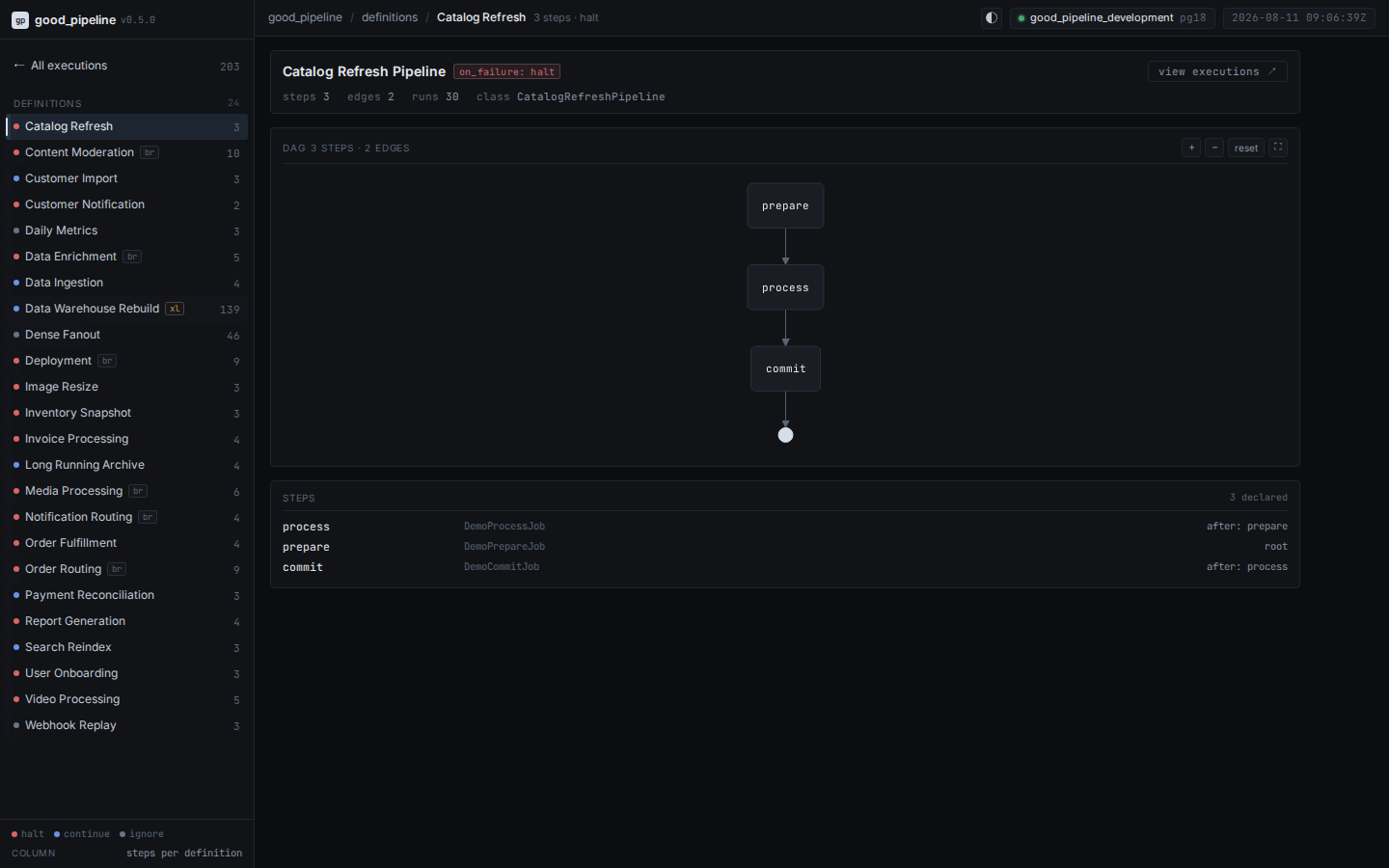
The definitions catalog shows each type's strategy, declared steps and dependencies, edge count, execution count, and structural graph. Persisted barriers appear as readable Barrier N synchronization nodes; they count as steps but have no GoodJob link or duration.
Scale behavior
- Up to 12 steps, execution rows show one status marker per step; branch and barrier steps use distinct structural markers.
- Above 12 steps, rows use a stacked status bar and expanded step lists sort failures and active work first.
- Above 60 steps, execution and definition DAGs open in an aggregated stage view. A full graph can still be requested.
- Above 1,000 dependency edges, full Mermaid rendering is disabled with an explanation, independently of the step-count threshold. The stage view stays available.
Mermaid runs in strict security mode. Graph labels are transported as escaped data, and render failures produce a visible error rather than an empty panel.
GoodJob integration and retention
The dashboard discovers GoodJob's mounted engine path and links to individual jobs. Step durations are loaded in one batch from good_jobs; no timing columns are duplicated in GoodPipeline.
GoodPipeline cleanup follows GoodJob's configured preservation window and only deletes terminal pipelines, including canceled. Pending, running, and canceling pipelines are retained. If one of those pipelines outlives the GoodJob window, its early job rows may already be gone; affected steps correctly show — and no timeline bar.
Upgrading to 0.5
Existing applications should generate and apply the dashboard indexes:
bin/rails generate good_pipeline:upgrade
bin/rails db:migrate
The generator creates at most one add_good_pipeline_dashboard_indexes migration. Indexes are built concurrently and use if_not_exists, so the migration is safe to re-run against a database where they already exist.
An interrupted concurrent build can leave an invalid index that PostgreSQL's if_not_exists will skip. Check for that state before retrying:
SELECT c.relname
FROM pg_index i
JOIN pg_class c ON c.oid = i.indexrelid
WHERE NOT i.indisvalid
  AND c.relname LIKE 'index_gp_pipelines%';

-- Run once for each invalid result:
-- DROP INDEX CONCURRENTLY <name>;
After dropping any invalid indexes, run the migration again.
Securing the dashboard
GoodPipeline's engine is a standard Rails engine mount and does not authenticate users. Even read-only execution data can be sensitive, and enabling mutations allows visitors to cancel or re-run pipelines. Mount it only behind your application's administrator authentication or routing constraint:
# config/routes.rb

# With Devise
authenticate :user, ->(user) { user.admin? } do
  mount GoodPipeline::Engine => "/good_pipeline"
end

# With Rails routing constraints
mount GoodPipeline::Engine => "/good_pipeline",
  constraints: AdminConstraint.new